

Want to know how to download Aadhaar Card PDF without OTP? You will learn about the step by step process to download your Aadhaar Card PDF in this article.
Quick Answer (Spoiler Alert)
You cannot download Aadhaar PDF without OTP using official methods. OTP verification is mandatory for security.
However, you can:
- Use a registered mobile number to receive OTP
- Download via DigiLocker (if already linked)
- Visit an Aadhaar center if OTP is inaccessible
Introduction
Many users search for ways to download Aadhaar without OTP. This can be usually because:
- Mobile number is not linked
- Number is inactive
- OTP not received
I know it’s usually an emergency when you’re looking for solutions to such issues online. And you need the answer in that moment.
The fact is:
OTP is required by UIDAI for security reasons. Otherwise, anyone who knows your Aadhaar card number may be able to download your Aadhaar card PDF online.
But don’t worry—this guide will show you all working alternatives and solutions.
📄 What is Aadhaar PDF (e-Aadhaar)?
e-Aadhaar is a digitally signed PDF issued by UIDAI. The online downloaded Aadhaar is called e-Aadhaar.
It contains:
- Aadhaar number (12 digit unique nuber)
- Name & DOB
- Address (your registered address)
- QR code with which you can verify the authenticy of the document.
e-Aadhaar is a legally valid document everywhere.
You can use your e-Aadhaar just as you use your ordinary Aadhaar card. Next, let’s see how you can download your Aadhaar card PDF online easily.
Method 1: Download Aadhaar Card PDF with OTP (Official Method)
Step-by-step procedure:
Here is the step-by-step procedure to download your Aadhaar card PDF from the official website of UIDAI.
- Visit UIDAI portal
- Click “e-Aadhaar Download”
- Enter:
- Your Aadhaar number / VID
- Captcha
- Click “Send OTP”
- Enter OTP
- Download PDF

You will have the option of downloading your masked Aadhaar or without masking. See the onscreen options before clicking the download button.
🔐 e-Aadhaar Password Format:
Your downloaded e-Aadhaar card PDF will be password protected. The format of e-Aadhaar password is – First 4 letters of your name (CAPS) + your birth year
Example:
RAJU + 1995 → RAJU1995 will be your e-Aadhaar password.
Also read: Driving License Download PDF Without Login (Easy Guide 2026)
Can You Download Aadhaar Without OTP?
Short answer is No. Let’s see why.
UIDAI requires OTP to:
- Prevent fraud
- Protect identity
- Ensure secure access
See? You can rest be assured that your Aadhaar card PDF download is secure and can be done by you or with your consent only.
Also read: How to Download PAN Card PDF Without Login (2026 Guide)
Alternative Methods (WORKAROUNDS)
The following alternative methods are available to download your Aadhaar Card PDF online.
Option 1: Use DigiLocker
If Aadhaar is already linked, you can download via Digilocker.
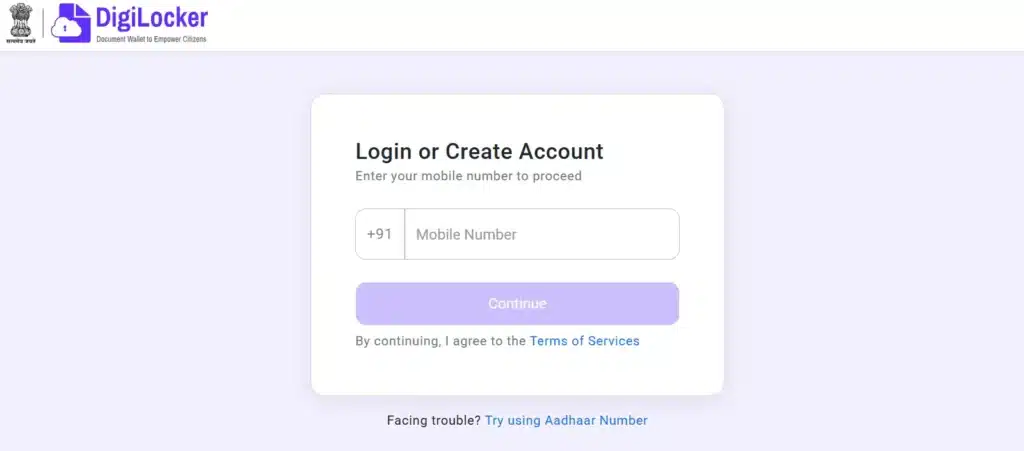
To do this:
- Open DigiLocker
- Click Login/Register on the top right corner
- Enter you rmobile number and OTP
- Go to “Issued Documents”
- Download Aadhaar
No OTP required at download stage, but is may be required while logging in to your Digilocker account.
Option 2: Update Mobile Number
You may be having difficulty receiving OTP. If OTP is not received, you may:
- Visit Aadhaar center
- Update mobile number
- Try again
Option 3: Aadhaar Enrollment Center
You can also visit Aadhaar enrollment centre to avail various Aadhaar services.
You can:
- Get print copy
- Request Aadhaar
Common Problems & Fixes
Now let’s take a look at some of the common problems you may face while trying to download your Aadhaar card PDF online.
OTP Not Received
In cae you do not receive OTP, here are the possible fixes:
- Check your mobile network
- Wait for 2–3 minutes
- Retry after awhile
Mobile Number Not Linked
You will not be able to download e-Aadhaar if your mobile number is not linked.
In such a case, your solution would be to:
- Visit Aadhaar center and have your Aadhaar card pdf downloaded for you.
Download Failed
Your mobile is linked, you receive OTP. What else could go wrong, right?
Your download may fail although you are at the very last step. But not to worry, here is a solution:
- Change your browser
- Clear cache and retry
You should then be able to download your Aadhaard card easily and save it on your phone or computer.
Can You Download on Mobile?
Yes, you can download e-Aadhaar card on your mobile phone.
To do this:
- Use Chrome or Safari
- Visit the UIDAI page and follow the steps mentioned above
- Save Aadhaar PDF
- Open using the password
FAQs
Q1. Is OTP mandatory?
Yes. For a self service download, OTP is required.
Q2. Is e-Aadhaar valid?
Yes, e-Aadhaar is very much valid across all official channels and purposes.
Q3. Can I use DigiLocker instead?
Yes, that’s one alternative method to download your Aadhaar card.
Need More Help?
We can help you:
- Download Your Aadhaar
- Update Your Mobile Number
- Fix OTP issues
Contact our team now to get instant help.
Do check out our other help articles on PAN card, Driving License and other Government Services as well.